Why Your AI Images Look Generic
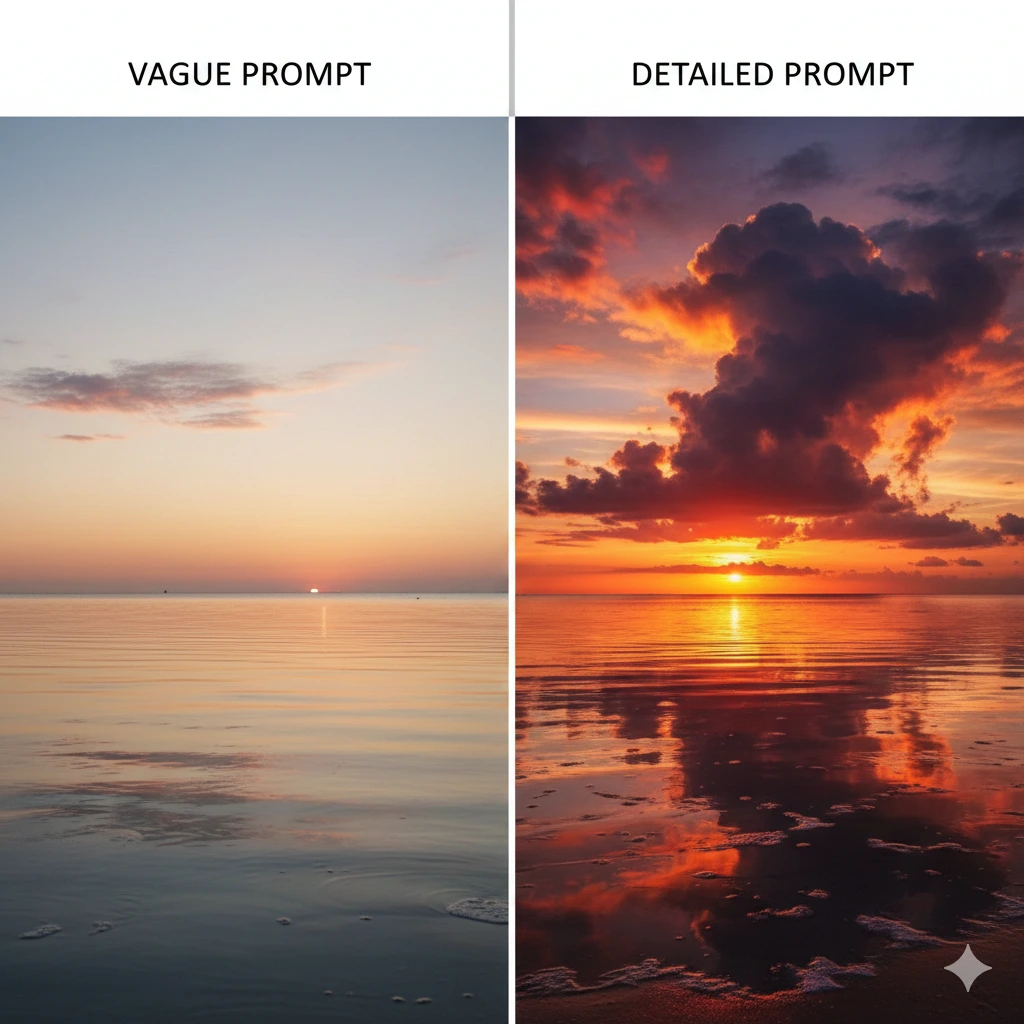
You type "a sunset over the ocean" into an AI image generator and get... exactly what you'd expect. A generic sunset. Generic ocean. Nothing special. You try again with "a beautiful sunset" and get basically the same thing with slightly different colors.
Here's what's happening: you're treating image prompts like search queries instead of instructions. The same principle that applies to chat prompts applies to image generation—detail and context are everything. A vague prompt produces vague results. A detailed, specific prompt produces images that actually match your vision.
Google Gemini Pro: Fast and Creative
Google Gemini Pro has become my go-to for image generation, and for good reason. It's fast—generating images in seconds, not minutes. And it's surprisingly creative, especially when you give it the right prompts. But like any AI image generator, it only delivers when you know how to ask.
The key insight most people miss: image prompts work exactly like chat prompts. You need to provide context, specify style, describe composition, and include relevant details. The more information you give Gemini Pro, the closer it gets to what you're actually imagining.
Building Better Image Prompts
Think about how you'd describe a scene to an artist. You wouldn't just say "draw a sunset." You'd provide details: the colors you want, the mood, the perspective, what's in the foreground, whether it's realistic or stylized. That's exactly how you should prompt AI image generators.
Instead of "a sunset over the ocean," try: "A dramatic sunset over a calm ocean, viewed from a beach. Vibrant orange and pink clouds reflected in the water. Foreground shows wet sand with gentle waves. Photorealistic style with rich colors and soft lighting."
BETTER PROMPT STRUCTURE
Subject: What's the main focus?
Setting/Context: Where is this happening?
Style: Photorealistic, watercolor, digital art, sketch?
Details: Colors, lighting, mood, composition
Perspective: Close-up, wide angle, aerial view?
Expect to Iterate (Especially at First)
Here's the reality: your first prompt probably won't nail it. Especially when you're learning how a specific AI interprets instructions. Gemini Pro might emphasize different aspects than DALL-E or Midjourney. Each AI has its own personality, its own way of interpreting prompts.
This is completely normal. Generate your first image, see what works and what doesn't, then refine. Maybe the colors are too muted—add "vibrant" or "saturated colors." Maybe the composition is off—specify "centered subject" or "rule of thirds composition." Maybe the style isn't quite right—try "cinematic lighting" or "soft focus background."
With Gemini Pro's speed, iteration is actually efficient. You can test variations quickly, learning what language produces the results you want. After a few rounds, you'll start to understand how this particular AI interprets your instructions.
Real Example: From Generic to Specific
First Attempt:
"A coffee shop"
Result: Generic interior, standard tables and chairs, boring.
Second Attempt:
"A cozy coffee shop interior, warm lighting, people working on laptops, plants on shelves"
Result: Better, but still feels stock photo-ish.
Final Attempt:
"Interior of a modern independent coffee shop during golden hour. Large windows with warm sunlight streaming in. Exposed brick walls, vintage wood furniture, hanging Edison bulbs. A few customers working on laptops at different tables. Potted plants on floating shelves. Shot from corner angle showing depth. Photorealistic with warm color grading and soft shadows."
Result: Now we're talking. Specific, atmospheric, exactly the vibe intended.
The Pro Tip: Reverse Engineer Your Success
Here's a technique that will dramatically accelerate your learning: once you've iterated your way to a great image, ask Gemini Pro to write the prompt that would generate that exact image on the first try.
HOW TO DO IT
- Generate your image through iteration until it's exactly what you want
- In the same chat, ask: "Write a detailed prompt that would generate this exact image on the first attempt"
- Study what Gemini Pro writes—notice the specific language, the details it emphasizes, the structure it uses
- Save these AI-written prompts as templates for future projects
This reverse-engineering technique is gold. You're essentially learning Gemini Pro's preferred prompt language directly from the source. The AI shows you exactly how it wants information structured, which details matter most, and what terminology produces the best results.
Over time, you'll build a library of successful prompts that you can adapt and remix. You'll start to recognize patterns—how Gemini Pro interprets "cinematic" versus "documentary style," how it handles "soft lighting" versus "dramatic lighting," how it responds to composition instructions.
Why Each AI Is Different
You might wonder: can't I just use the same prompts across all AI image generators? Not really. Each AI is trained differently, interprets language differently, and has different strengths. What works perfectly in Gemini Pro might produce unexpected results in DALL-E or Midjourney.
That's why the reverse-engineering technique is so valuable. You're not just learning generic "image prompting"—you're learning how this specific AI thinks. When you switch to a different generator, repeat the process. Generate some images, iterate, then reverse engineer your successes to learn that AI's language.
QUICK TIPS
- Start with subject and setting, then layer in style, lighting, and composition details
- Use specific color names ("burnt orange," "deep teal") instead of generic terms
- Specify artistic style or photography technique when relevant ("bokeh effect," "long exposure," "watercolor")
- Don't be afraid to get detailed—more context almost always produces better results
- Save your best prompts and successful iterations as templates for future use
The Bottom Line
KEY TAKEAWAY
Image prompts work just like chat prompts—detail and context are everything. Embrace iteration when you're learning, then use the reverse-engineering technique to learn how your chosen AI actually wants to be prompted. You'll go from generic results to exactly what you envision.
Want to learn more? Check out Practical AI for Humans for more practical guides on using AI effectively.